


This article applies to the following products: - W261AS - W261AQ
Sound is measured in decibels (dB). A whisper is about 30 dB, normal conversation is about 60 dB, and a loud vehicle running is about 95 dB.
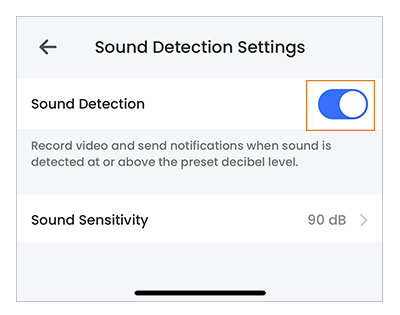
Enabling Sound Detection will record video and send notifications when sound is detected at or above the preset decibel level.
To set Sound Detection Settings
Launch the Lorex Classic App.
Tap
 icon above the channel thumbnail on the Devices screen.
Tap Sound Detection Settings.
Tap
 icon to enable Sound Detection. Tap again to disable.
To change Sound Sensitivity
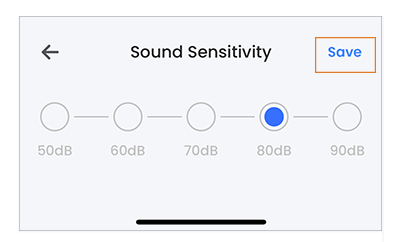
If you are getting too many Sound Detection notifications in your Lorex Classic App, you can decrease the decibel level by following these steps:
Launch the Lorex Classic App.
Tap
icon above the channel thumbnail on the Devices screen.Tap Sound Settings.
- Tap Microphone Volume.
- Tap and select the level of Sound Sensitivity, then tap Save.
Note: The default decibel level is 90dB.