


The following article provides both Lorex App and recorder instructions for using your wired IP deterrence camera's siren.
TABLE OF CONTENTS
- Manually Activate Your Deterrence Camera's Siren (Lorex App)
- Set Your Deterrence Camera's Siren Settings (New Local UI)
- Manually Activate Your Deterrence Camera's Siren (New Local UI)
Certain Lorex deterrence IP cameras have a built-in speaker that can play alarm sounds to deter intruders. You can manually activate the siren from the Lorex App or activate different sirens from the recorder.
The siren is compatible with certain Lorex IP cameras. For a complete list of compatible cameras, navigate to your recorder series at lorex.com/compatibility.
Manually Activate Your Deterrence Camera's Siren (Lorex App)
Pre-requisite: Download the Lorex App and connect your system. Refer to the article DVR / NVR - Download the Lorex App for full instructions.
- Open your Lorex App app and login.
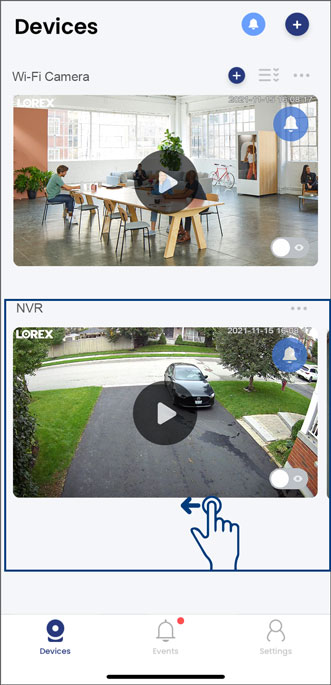
- Under your recorder, swipe left and tap on your deterrence camera.
- In the Live View display, tap the Siren icon.
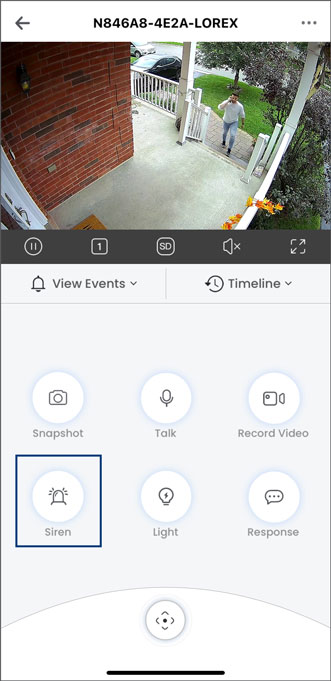
The siren will play for 10 seconds. Tap again to manually turn it off.
Set Your Deterrence Camera's Siren Settings (New Local UI)
- From the Live View display, right-click to open the Quick Menu, then click Main Menu.
- Click Events, then Event Settings. Click the Siren tab from the side panel.
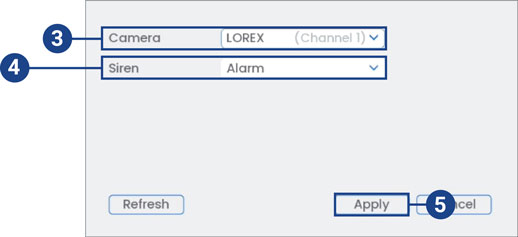
- Select a channel of a connected deterrence camera.
- Select one of the siren options from the drop-down list.
- Click Apply to save changes.
Manually Activate Your Deterrence Camera's Siren (New Local UI)
In the Live View display, hover the mouse pointer near the top of the camera image to reveal the Camera Toolbar. Click the siren icon to activate it. Click again to manually turn it off.

To learn about using deterrence light features, refer to the articles Using the Deterrence Light (Warning Light) and Using Smart Security Lightingâ ¢.
For detailed instructions on configuring your system, refer to your recorder's Series Manual on the product support page. Visit help.lorextechnology.com and search your recorder's model number.