


This article provides instructions for installing your 4K IP Wired Dome Camera.
What's Included
- 4K Vandal Proof Dome Camera
- Allen key
- Mounting Template
- Anchors & Screws
- Ethernet Extension Cable
Tools needed: Drill and screwdriver
Camera Placement Tips
- Take into consideration what you want to monitor and where is the best coverage area.
- Place your camera close to the area of interest.
- Point the camera where there is the least amount of obstructions (i.e. tree branches).
- Install the camera in a location that is difficult for thieves and vandals to reach.
- The best position is 10 ft (3 m) above ground, angled 15Ã ° down.
- Secure cabling so that it is not exposed or easily cut.
Mounting
Warning! Make sure the mounting surface is strong enough to hold at least 3x your camera's weight (2.25 lbs / 1.02 kg). * Do not remove the dome cover in humid or dusty environments. * Always wash your hands before handling your camera. * Test your camera prior to selecting a permanent mounting location. * For wall mounting, make sure your camera's microphone is facing down.
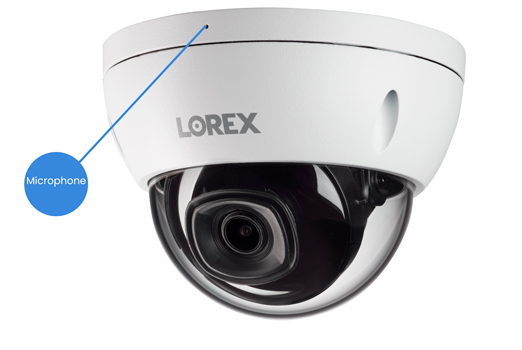
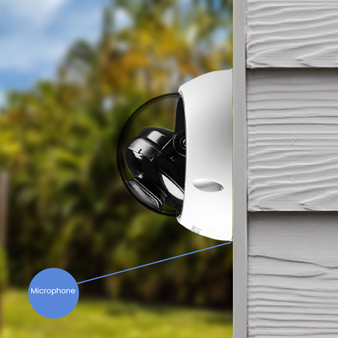
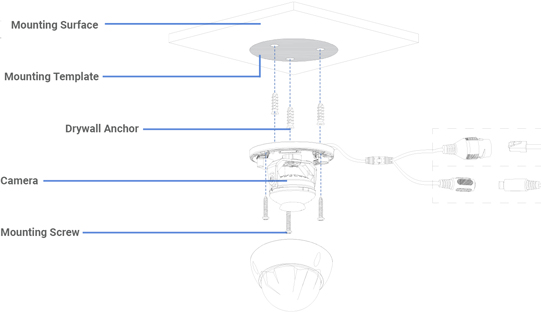
- Use the mounting template to drill holes for screws, then insert the drywall anchors. Drill a hole for the camera's cable if you plan to run it through the mounting surface.
- Use the Allen key to loosen the camera's adjustment screws, and then remove the dome cover from the camera base.
- Use the screws to mount the camera base to the surface. If you are running cables along a wall/ceiling, make sure to pass the cable through the cable notch.
- Feed the camera's cable through the camera base, and then connect the cables.
- Position your camera as needed, and then attach the dome cover to the camera base by tightening the adjustment screws.

- Remove the vinyl film from the camera lens once your installation is complete.
Camera Connection
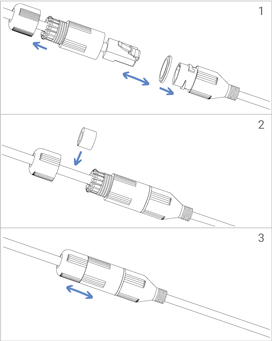
- Connect your camera directly to your recorder using the camera's Ethernet extension cable.

- Twist the Ethernet extension cable's pre-attached weather-resistant cap securely onto your camera's Ethernet connector. If exposed to regular precipitation, seal the cap with silicone and electrical tape.
Don't forget to register your product!