


This article provides instructions to mount your 2K HD Smart Deterrence Camera (U471AA).
To mount your camera:
-
Stick the mounting template to the mounting surface or hold it up to mark the holes.
Optional: If installing on concrete, stucco, brick or any other masonry surface drill holes using a 7/32" or 15/64" (5.5-6mm) drill bit then insert the anchors.
-
Match and place the UP arrow
 of the mounting plate to the TOP arrow
  of the mounting template.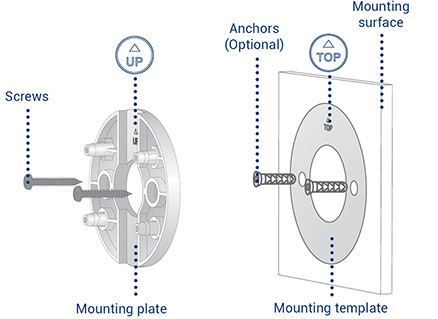
- Using a Philips head screwdriver and screws secure the mounting plate to the mounting template.
- Match and place the arrow of the mounting bracket to the UP arrow of the mounting place.
-
Insert the mounting plate's four tabs into the mounting bracket then push down until an audible click sounds. The click indicates that the bracket is locked in place.
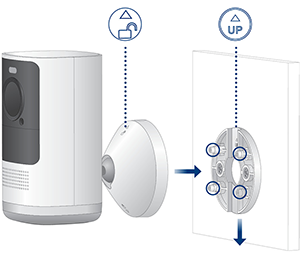
Note: To detach the mounting bracket from the mounting plate, push the backet up.
-
Adjust and angle the bracket's adjustable screw.
Optional: For additional adjustment, loosen the bottom of the braket's three screws then tighten when done.
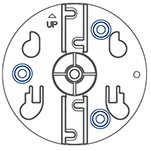
-
Tighten the bracket's adjustable screw to fasten the camera.
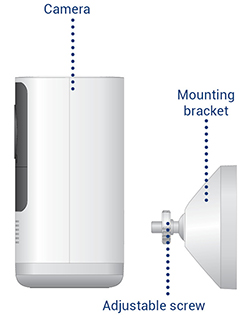
Congragulations! Your camera's mounting installation is complete.