This article will give you a step-by-step guide to installing the 2K Battery Video Doorbell.
Note: Setup the 2K Wired Video Doorbell in the Lorex App before mounting the doorbell.
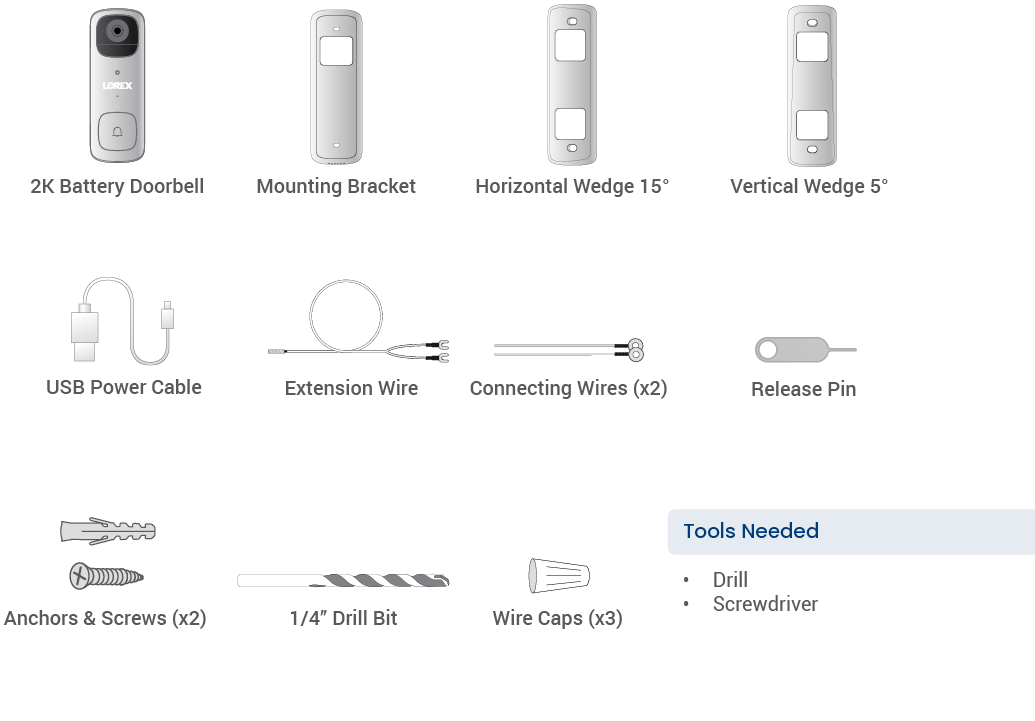
What's Included?
Step 1 - Connect to the app
-
Download the Lorex App app.

- Pull back the RESET/microSD card slot cover located on the side of the video doorbell.
- Short press the Reset Button.
- Tap

 - If the status indicator does not start flashing blue, use the included USB power cable to power on your device, and then short press the reset button.
- Do not remove the USB power cable while connecting to the app.
- If the status indicator does not start flashing blue, use the included USB power cable to power on your device, and then short press the reset button.
- Do not remove the USB power cable while connecting to the app.
Step 2 - Battery Setup
-
Fully charge your Battery Doorbell before mounting. This could take up to 3 hours. 5V/2A power adapter is recommended (not included). Once fully charged, the status indicator will turn solid blue.
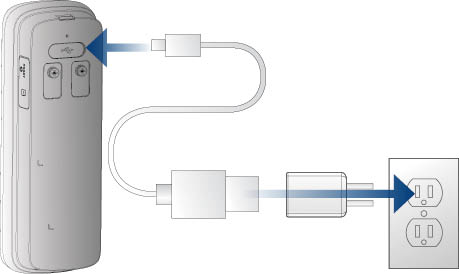
Recommendation: Charge your doorbell at the optimal environmental temperature of 32Ã °F to 113Ã °F (0Ã °C to 45Ã °C). The optimal operating temperature is -4Ã °F to 122Ã °F (-20Ã °C to 50Ã °C).
Go to and complete Step 5 - Mounting Setup.
- Press the doorbell into the Mounting Bracket. You will hear a 'click' when it secures into place.
Step 3 - Wired Preparation
WARNING: TURN OFF THE POWER RUNNING TO YOUR EXISTING CIRCUIT AT THE BREAKER
- Test that power has been disconnected by pressing the button on your existing doorbell. There should be no sound.
- 8-24 VAC is required. If you do not have this voltage, you will need a 8-24 VAC doorbell transformer.
- Always be careful when handling electrical wiring. If you are not comfortable doing it yourself, consult a licensed electrician.
IMPORTANT: 8-24V AC transformer is required. If your house does not have a compatible transformer, you will need to purchase a 8-24V AC doorbell transformer. Refer to the article â What transformer should I use with the 2K Video Doorbell?â for details.
Step 4 - Wiring the Doorbell
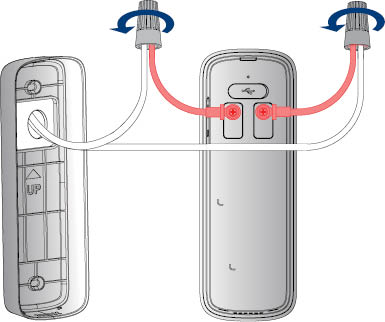
If your existing doorbel wiring is too short, replace the Connecting Wire with the provided Extension Wire.
- Remove your existing doorbell and disconnect the wiring. Tip: Bend the power cables so they do not fall through the wall.
- Go to and complete Step 5 - Mounting Setup.
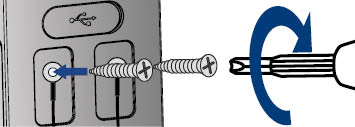
- Completely remove the Power Port Terminal screws completely with a Philips-head screwdriver.
-
Thread the screws through the metal loops of the Connecting Wires, and then tighten the screws clockwise.
-
Align the ends of your existing wiring and Connecting Wires, place the wire caps over the exposed wiring, and then twist the wire cap clockwise to tighten.
Step 5 - Mounting Setup
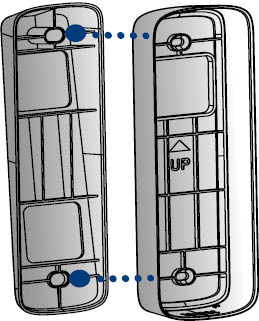
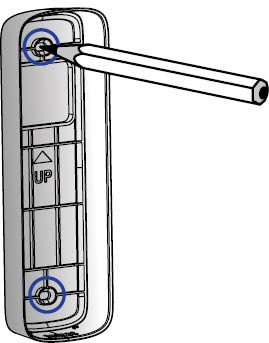
- Place the Mounting Bracket on the desired location with the
 arrow pointing up.
 -
Mark the holes for screws.
-
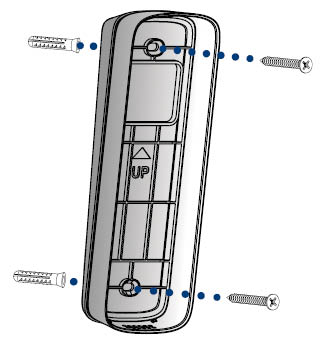
Using a Phillips-head screwdriver and the provided screws, secure the Mounting Bracket to the surface.
Optional: Drill 1/4â (6mm) holes for the anchors.
Wedge Installation (Optional)
- Align and place either one of the horizontal or vertical wedges to the Mounting Bracket according to the direction you want the doorbell to face.
-
To change the direction of the angle, flip the horizontal or vertical wedge upside down.